Ask most B2B sales teams what they use AI for in outbound and you will hear the same answer: writing emails. Maybe personalized subject lines. Maybe a first line based on the prospect's LinkedIn bio.
The teams pulling real leverage from AI outbound are applying it across the entire workflow, from the moment they define who to target to the moment a reply lands in the inbox. The email copy is the least interesting part of it.
This is not a survey of AI tools. It is a breakdown of what an effective AI outbound workflow looks like in practice: what each tactic does, why it matters, and where the human judgment still has to live.
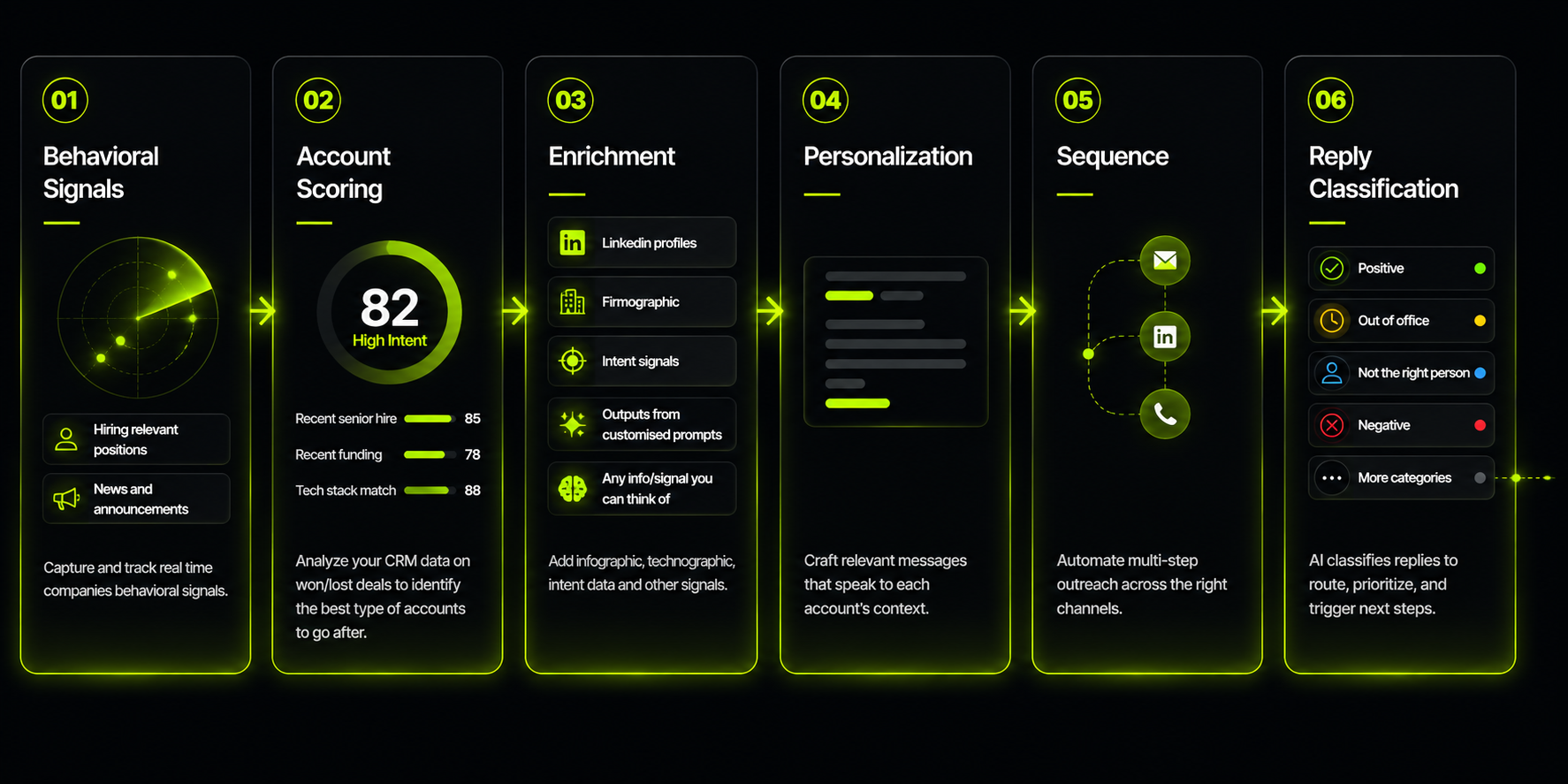
- Most teams use AI only for email copy. That captures a fraction of the available leverage.
- The highest-impact uses are upstream: replacing basic filters with behavioral signals, layering enrichment sources for near-complete contact coverage, and scoring accounts from your own won/lost data.
- AI-generated personalization works when it uses real account data as input, not templates. The specificity comes from the signal, not the model.
- Sequencing and reply handling can run largely on autopilot, with defined human review gates before anything critical goes out unsupervised.
- The goal is not to remove humans from the workflow. It is to let one skilled operator cover the output of a team.
8 Recommended Tactics
Tactic 01Replace firmographic filters with behavioral signals
Most outbound lists are built on filters: industry, headcount, geography, revenue range. These are useful for narrowing a universe, but they tell you nothing about timing. Two companies that look identical on paper can be in completely different buying positions depending on what is happening inside them right now.
Behavioral signals change that. A company posting three VP of Sales roles in 60 days is building a sales motion. A company that just closed a Series B is about to spend. These are signals you can act on. AI tools can monitor hundreds of accounts simultaneously and surface these signals as they appear, work that previously required a large research team or simply did not get done.
The practical shift: build your lists around signals, not just filters. Firmographic criteria define the universe. Signals define who in that universe is worth reaching right now.
For a deeper look at how to identify and act on the right signals, see Signal-Based Targeting: How to Identify Accounts in Motion.
Tactic 02Score accounts from your own data, not generic criteria
The strongest ICP signal you have is your own closed-won deals. What did the companies that converted have in common? What did the losses reveal? Most teams do not systematically mine this data. They rely on intuition, or they apply industry benchmarks that have nothing to do with their specific product and market.
AI makes it practical to build a scoring model directly from your own win/loss history. Feed it your CRM data, your deal notes, your churned accounts, and your best customers. Let it surface the patterns. The output is a scoring framework grounded in what has actually worked for you, not what works in theory for someone else in your category.
At seed and early Series A, you may not have enough data to make this statistically meaningful. In that case, score on signals and refine the model as you close deals. The important thing is that scoring is driving prioritization, not gut feel.
For a deeper look at how to build and apply an account scoring model, see Account Scoring Done Right.
Tactic 03Layer enrichment sources for near-complete contact coverage
No single data provider has complete coverage. A typical single-source enrichment pass returns verified contact data on 20 to 30 percent of records. That means seven out of ten accounts on your list never get reached because the email is missing or bounces.
Waterfall enrichment fixes this. You run the record through multiple providers in sequence, each one filling the gaps the previous one left. Done well, coverage climbs to 80 to 90 percent. The economics shift entirely: instead of building a list of 500 accounts and reaching 150, you reach 430.
Tools like Clay make this very easy to do at scale. You set up the waterfall logic once and it runs on every new record automatically. The per-credit cost is real, but so is the improvement in reach.
For a full breakdown of how waterfall enrichment works and how to configure it, see Waterfall Enrichment: Why One Data Provider Is Never Enough.
A single-source enrichment pass reaches 20 to 30 percent of records. A properly configured waterfall reaches 80 to 90. That is not a marginal improvement. It is a different business.
Use website visitor identification as a warm inbound feed
Someone visiting your pricing page is not a cold prospect. They have already found you, looked at your offer, and decided it was worth their time to read further. That is a meaningfully different starting position than a cold outreach to someone who has never heard of you.
Website visitor identification tools de-anonymize that traffic and surface the company or person behind the visit. The warm accounts this generates can feed directly into your outreach sequence, but with a different opening. You are not introducing yourself. You are following up on interest they already showed.
This works best as a parallel feed into your outbound motion, not a replacement for it. Traffic volumes at early-stage companies are usually too low to build a pipeline on. But the accounts it surfaces are consistently higher quality than cold list-builds, and the open rates reflect that.
For a deeper look at how visitor identification works and how to use it, see Website Visitor Identification: Turning Anonymous Traffic into Outbound Pipeline.
Tactic 05Generate personalization that uses real account data, not templates
Generic AI copy fails because it starts with no context. "I noticed your company is growing fast" is not personalization. It is a placeholder that signals you did not do any research. Prospects read it and move on.
The fix is not better prompts. It is better inputs. Feed the model a specific signal, a recent executive hire, a funding announcement, a job posting that reveals a new initiative, and ask it to write a first line anchored to that specific thing. The output reads like research because it is. The specificity comes from the data, not from the model inventing something plausible.
This also means the personalization does not have to live in the first line. It can shape the entire angle of the email: why this person, why now, why this matters to their specific situation. AI can generate that structure at list scale once the signal data is in place.
For a full breakdown of how AI personalization works in practice, see AI Personalization at Scale: Relevance Without the Manual Work.
Tactic 06Run multi-touch sequences without manual management
It takes 4 to 8 touches on average to get a first response. The exact number varies by industry and how senior the persona you are targeting. Most sales reps stop after one or two, either because they forget to follow up or because manually managing a multi-touch sequence across hundreds of accounts is not sustainable.
AI-assisted sequencing solves the execution problem. Once the sequence logic is defined, spacing, tone shifts across touches, what to say when there has been no reply. The tool runs it consistently across every account without someone tracking it manually. The judgment about what the sequence should say still belongs to a human. The execution does not.
The right spacing matters. Sending five emails in five days reads as spam. A sequence spaced over three to four weeks with genuine value or a new angle in each touch reads as persistence. That distinction is entirely in how you configure it.
For a detailed look at sequence structure, touch cadence, and what AI changes about this, see Multi-Touch Sequencing: How to Stay Present Without Being Ignored.
Tactic 07Classify replies and automate intelligent follow-ups
Not all replies need the same response. An "out of office" is different from a "not the right person, try X" which is different from "send me more information" which is different from "interested, let's talk." Treating all of them the same wastes time and misses opportunities.
AI reply classification reads incoming responses and routes them: flag as interested, route to a human for a referral, send an automated response with the requested information, log the objection for a future follow-up at a different time. Done well, this means nothing falls through the cracks and the responses that need human attention get it immediately.
This is where unsupervised automation creates the most risk. A misclassified "interested" reply that gets an automated response instead of a human follow-up is a missed meeting. Define your review gates clearly before letting this run autonomously.
For a full breakdown of reply types and how to route each one, see Reply Classification: How to Make Sure No Response Falls Through the Cracks.
Tactic 08Define where humans stay in the loop
The question is not whether to automate. It is where to draw the line. Full automation without review gates leads to errors that reach your best prospects. Full manual management defeats the purpose of using AI at all.
The minimum human review points in a healthy AI outbound workflow, for example, but not only: before any account enters the sequence for the first time, when a reply is classified as interested or meeting-ready, and any time the workflow handles an objection or a negative reply. Everything else can run on autopilot.
The goal is one skilled operator working at a scale that used to require a team of five. That does not happen by automating everything. It happens by being precise about which decisions require judgment and keeping a human in the loop only for those.
For a detailed look at where to place review gates and how to build them into the workflow, see Human Review Gates: Where to Keep Humans in the AI Outbound Loop.
What this looks like end to end
A well-configured AI outbound workflow starts with accounts scored on behavioral signals and custom ICP criteria, not just firmographic filters. Contact data is enriched through a waterfall covering 80 to 90 percent of records. Website visitor data feeds a warm track running in parallel. Each account enters a personalized sequence with first-touch copy built from real account signals, not templates.
The sequence runs multi-touch over three to four weeks. Replies are classified automatically and routed appropriately. A human reviews anything flagged as interested before a response goes out. Everything else runs without manual intervention.
One person can manage that system. It does not require an SDR team. It requires someone who understands the logic well enough to configure it, review the output, and catch errors before they matter. That is the actual unlock AI outbound offers, not the elimination of judgment, but the compression of execution.

Questions on AI outbound tactics
Using AI only for email copy while leaving targeting, enrichment, and follow-up manual. That captures maybe 10% of the available leverage. The highest-impact uses of AI in outbound are upstream: scoring accounts, surfacing behavioral signals, layering enrichment sources for near-complete contact coverage, and running intelligent multi-touch sequences without manual management.
Use real account data as input, not templates. Feed AI a specific signal, a recent hire, a funding announcement, a job posting that reveals an initiative, and ask it to write a first line anchored to that signal. The result reads like research because it is. Generic AI copy fails because it starts with no context. Informed AI copy works because the specificity comes from real data, not the model's imagination.
At minimum: before any email touches a prospect for the first time, when AI classifies a reply as interested or meeting-ready, and any time the workflow handles a negative or objection reply. Full automation without review gates leads to errors that reach your best prospects. The goal is not to remove humans. It is to let one human cover the work of five by reviewing AI output rather than producing it from scratch.
Yes, with adjustments. If you do not have enough closed-won deals to build a data-driven scoring model, use behavioral signals to drive prioritization instead and refine your ICP criteria as you close deals. The signal-based and enrichment tactics apply regardless of company stage. The scoring model gets more precise as your own data grows.
Account Scoring Done Right
Custom signals beat basic filters. How to build a scoring model that surfaces accounts most likely to convert.
AI Has Not Changed What Works in Sales. It Accelerated It.
The AI SDR replacement thesis largely failed. Here is what actually works in B2B outbound in 2026.
The Full GTM Cycle: Best AI-Native Tools for Each Stage
A stage-by-stage breakdown of the best AI-native tools for each part of the outbound cycle.
Signal-Based Targeting: How to Identify Accounts in Motion
Firmographic filters tell you who fits. Signals tell you who is ready to buy right now.
Waterfall Enrichment: Why One Data Provider Is Never Enough
A single provider covers 40 to 55 percent of your list. Waterfall enrichment reaches 80 to 90 percent coverage.
Building GTM at a B2B startup? I am running a limited number of free 30-minute calls this quarter for founders and first GTM hires who want a second opinion on their outbound setup. No pitch. Just a direct conversation about what you are working with.
Book a Call