The B2B GTM stack has changed more in the last three years than in the previous decade. There are now specialized tools for every part of the outbound cycle, and the quality gap between early-stage-friendly options and legacy enterprise platforms has closed significantly. The challenge is not finding tools. It is knowing which ones fit where, which ones are worth the investment at your stage, and how they connect into a working system rather than a pile of disconnected subscriptions.
This guide covers nine stages of the outbound GTM cycle, with a curated set of tools for each. Use it as a map for building or auditing your stack, not a prescription to implement everything at once.
- Nine segments, one system. Each stage of the GTM cycle has its own tools. The goal is a stack where each tool feeds the next, not a collection of unconnected point solutions.
- Start with the foundation. ICP and targeting, data enrichment, a CRM, and email sequencing. These four stages give you a working outbound operation. The rest layers in as you scale.
- This is a curated sample. There are many strong tools not included here. The ones that made this list fit early-stage teams in terms of cost, complexity, and AI capability. Many tools cover more stages than shown; where they appear reflects where they are strongest.
- Tools are not the only option. Parts of this stack can be built directly inside general-purpose AI platforms like Claude or ChatGPT. The dedicated tools solve these problems out of the box. The AI platforms offer more flexibility at the cost of more configuration. The right choice depends on your team's technical depth.
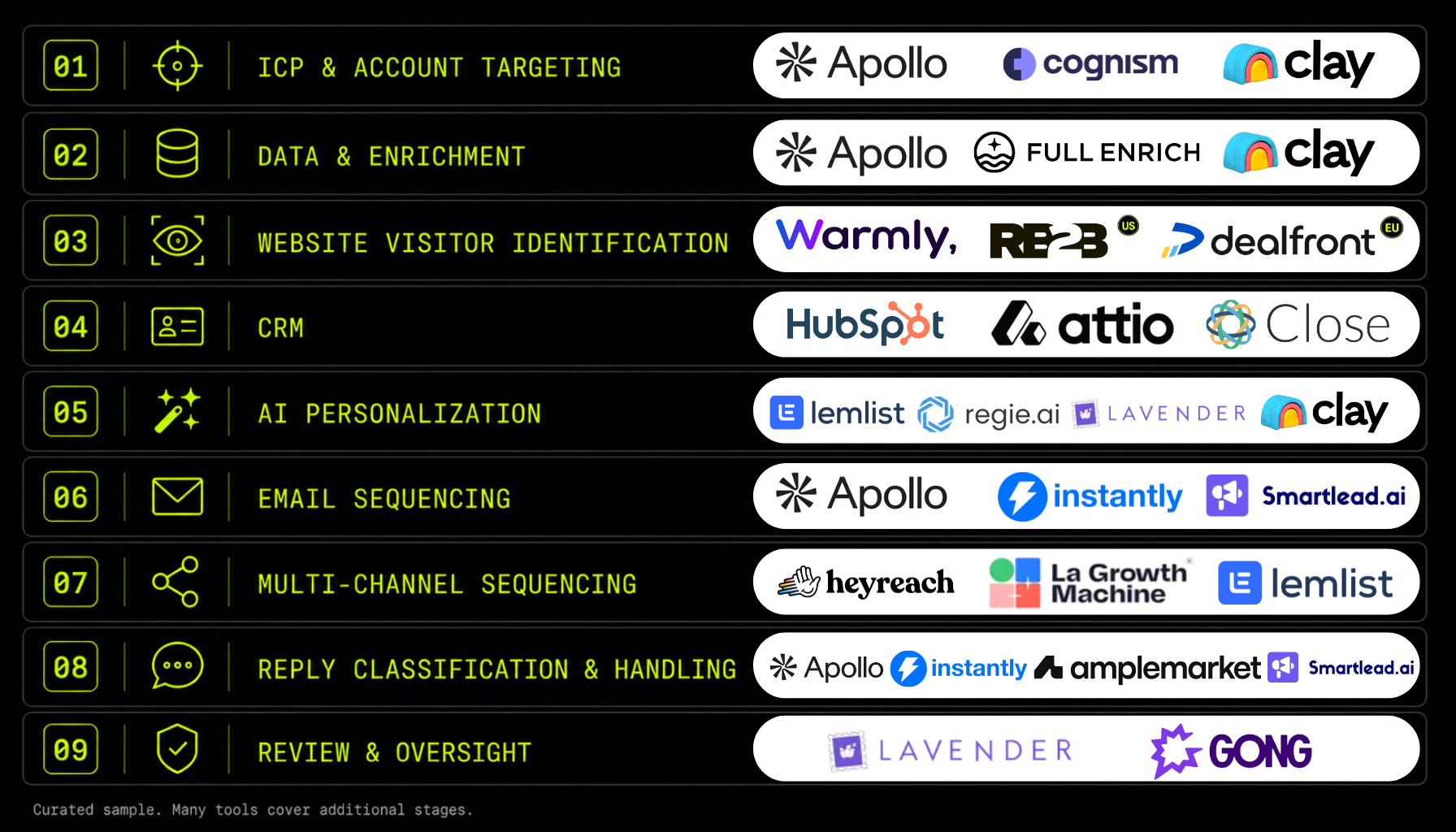
How we built this list. Every tool included is AI-native, AI-enabled, or has strong integrations with AI workflows. All are suited for seed or Series A teams in terms of complexity and pricing. We weighted proven traction heavily: strong user reviews, meaningful revenue, or institutional backing. Many tools in this guide cover multiple stages of the GTM cycle. Where a tool appears in more than one stage, that reflects where it is most impactful, not its full feature set. There are many great tools not on this list. This is a sample of some of the best-fit options for early and mid-stage B2B startups.
ICP & Account Targeting
Before any outreach, you need to know exactly who you are going after. ICP definition at this stage is not just firmographic filtering (industry, headcount, revenue). It is building a model that weights signals: who is growing, hiring, recently funded, or actively showing purchase intent. The tools in this stage help you build that model and pull a list that reflects it.
| Tool | Role at this stage | Why it is here |
|---|---|---|
| Apollo | B2B database with built-in ICP filtering, intent signals, and prospecting workflow | Largest accessible database for early-stage teams; intent data and filters in one platform |
| Cognism | Premium B2B data with verified mobile numbers and intent layer | Stronger data quality than most providers, especially for phone coverage and EU markets |
| Clay | Custom ICP scoring using enriched signals and AI; turns raw lists into prioritized targets | Lets you build a scoring model that reflects your actual ICP rather than using generic filters |
See also: Account Scoring Done Right
Firmographic filters tell you who could be a fit. Signal-based scoring tells you who is ready. The difference between the two is where most outbound programs leave pipeline on the table.
Stage 2Data & Enrichment
Once you have a target account list, you need contact data for the people you are going to reach. The standard problem: no single provider covers the full market. A single data source typically returns usable contact information on 40 to 55 percent of a B2B list. Waterfall enrichment sequences multiple providers in order, falling back to the next source when the previous one returns nothing, and reaches 80 to 90 percent coverage on the same list.
See also: Waterfall Enrichment: Why One Data Provider Is Never Enough
| Tool | Role at this stage | Why it is here |
|---|---|---|
| Clay | Orchestrates waterfall enrichment across multiple providers; runs fallback logic automatically | The control layer for the entire enrichment workflow; integrates with every major data source |
| FullEnrich | Purpose-built waterfall enrichment for email and phone; sequences multiple providers | High coverage rates, pay-per-find pricing, minimal setup; built specifically for the waterfall use case |
| Apollo | Large database; strong first stop before waterfall logic kicks in | Good hit rate on US B2B contacts; works well as the first provider in a waterfall sequence |
A list with 45 percent contact coverage means more than half your target accounts never get contacted. Waterfall enrichment is not a nice-to-have for teams running at volume.
Stage 3Website Visitor Identification
Most B2B visitors never fill out a form. Visitor identification tools reveal which companies are landing on your site, which pages they visited, and how many times. That information feeds directly into outbound: you know who is showing intent before they ever raise their hand. A company that has visited your pricing page three times is a higher-priority outbound target than one that matches your ICP but has shown no signal of interest.
See also: Website Visitor Identification: Turning Anonymous Traffic into Outbound Pipeline
| Tool | Role at this stage | Why it is here |
|---|---|---|
| Warmly | Identifies companies visiting your site; routes signals to CRM and outbound sequences automatically | AI-native with strong signal routing; $21M Series A; best overall option for most US-focused teams |
| RB2B US only | Person-level identification for US traffic; surfaces the individual, not just the company | The only major tool delivering person-level data for US visitors; does not function for EU traffic due to GDPR consent requirements |
| Dealfront EU | Company-level identification with European B2B data and GDPR-compliant infrastructure | Best option for teams with significant EU prospect traffic; strongest compliance posture in this category |
Note: RB2B works for US traffic only. GDPR consent requirements prevent person-level identification for EU visitors. Dealfront is the right choice for teams with European prospect traffic. For US-only outbound, Warmly and RB2B cover the primary use cases.
Anonymous traffic is not a dead end. It is the highest-intent signal most teams are sitting on and doing nothing with.
Stage 4CRM
The system of record for the entire GTM operation. Without a CRM, pipeline exists in spreadsheets or in people's heads, and activity is invisible to anyone who is not doing it. The tools in this stage are selected for early-stage teams specifically: modern, AI-friendly, and without the implementation overhead and cost of enterprise platforms. Each connects well with the rest of the stack.
| Tool | Role at this stage | Why it is here |
|---|---|---|
| Attio | AI-native CRM with flexible data model; built for modern GTM workflows | Designed from the ground up for the way outbound teams actually operate; strong AI integrations |
| HubSpot | Full-featured CRM with a strong free tier and integrations across the GTM stack | Best starting point for teams that want one platform to grow with; integrates with almost everything in this guide |
| Close | CRM built specifically for outbound sales teams; native calling, email, and SMS | Fewer configuration steps for teams whose primary motion is cold outbound; built for inside sales workflows |
The CRM is where the GTM system lives. Every other tool in this stack either feeds data into it or pulls from it. Getting this choice right early matters more than most teams expect.
Stage 5AI Personalization
The gap between volume and relevance is where most outbound programs fail. Templates that ignore who the prospect actually is get ignored. Manual personalization does not scale beyond a handful of accounts per day. AI personalization closes that gap by pulling signals from enrichment data, recent news, LinkedIn activity, and company context to generate messaging that reflects genuine research at volume.
See also: AI Personalization at Scale: Relevance Without the Manual Work
| Tool | Role at this stage | Why it is here |
|---|---|---|
| Clay | Pulls signals from enrichment, LinkedIn, news, and company data to generate context-specific messaging at scale | The most powerful personalization engine available for outbound; connects directly to enrichment workflow |
| Lavender | Real-time email quality scoring and coaching; flags issues before the email sends | Catches low-quality personalization before it reaches prospects; raises average email quality across the team |
| Regie.ai | AI copy generation for sequences; scales message production across personas, use cases, and verticals | $65.6M raised; purpose-built for sales copy at scale; strong for teams managing multiple ICP segments |
| Lemlist | Personalization features including dynamic images and video; combined email and LinkedIn sequences | Strongest personalization depth in a sequencing tool; good option for teams that want personalization and sending in one platform |
AI personalization is not about making emails sound personal. It is about making them accurate: the right context, the right signal, the right reason to reach out, applied consistently across hundreds of contacts.
The teams that convert at the highest rates are not the ones sending the most email. They are the ones sending email with the most signal behind it.
Email Sequencing
The infrastructure layer for cold email outbound. At this stage, deliverability is as important as copy. Sending cold email at volume without the right infrastructure (warmup, inbox rotation, domain management) means landing in spam regardless of how well-written the message is. The tools in this stage are built to solve that problem, not just to send email.
See also: Multi-Touch Sequencing: Why Persistence Is a Strategy, Not a Tactic
| Tool | Role at this stage | Why it is here |
|---|---|---|
| Instantly | High-volume cold email infrastructure; unlimited mailbox warmup, inbox rotation, deliverability management | Built specifically for cold email at scale; deliverability infrastructure is the core product, not an add-on |
| Apollo | Sequences built into the same platform used for prospecting and enrichment | Best for teams that want prospecting, data, and sequencing in one tool without data transfer between platforms |
| Smartlead | Multi-inbox management, automated warmup, and AI reply categorization | Strong alternative to Instantly; bootstrapped to $14M ARR; particularly strong for agencies managing multiple sender accounts |
Deliverability is not a setting you turn on. It is the result of how you prepare the domains and inboxes you send from. Cold volume sent from a fresh domain or a cold inbox gets flagged by inbox providers before anyone reads it, no matter how good the copy is. That is why domain and inbox warmup is a prerequisite, not an optimization.
The reasons go beyond deliverability alone. A new domain or mailbox has no sending history, and providers like Google and Microsoft treat unknown senders with suspicion. Warmup builds the track record of normal activity that marks you as a real sender rather than a spam operation. Cold outbound should also never run from your primary company domain, the one your website and real business email depend on, because a single blacklisting there damages everything your company sends. The standard practice is to send from secondary domains kept separate from the primary, warmed gradually so that volume ramps under the thresholds that trigger spam filters.
This can be handled two ways. Dedicated infrastructure tools give you the most control: Infraforge for provisioning secondary domains, Lemwarm for inbox warmup. Or you can rely on the warmup built directly into the sequencing tools above, since Instantly, Smartlead, and Apollo all include inbox warmup as part of the platform. Which approach fits depends on your volume and stage. An early-stage team at modest volume can lean on the warmup inside its sequencing tool. A team scaling across many mailboxes will eventually want dedicated infrastructure tooling.
The best-written cold email does nothing if it lands in spam. Deliverability infrastructure is not an optional add-on at scale. It is the foundation the rest of the sequence sits on.
Stage 7Multi-Channel Sequencing
Cold email alone has limits. LinkedIn is where many senior buyers spend the most professional attention, and a coordinated LinkedIn touchpoint alongside an email sequence consistently improves reply rates. The tools in this stage add LinkedIn, calls, and other channels to the outbound workflow, coordinated as part of a single sequence rather than run separately and manually.
| Tool | Role at this stage | Why it is here |
|---|---|---|
| HeyReach | LinkedIn automation at scale; manages outreach across multiple LinkedIn accounts simultaneously | Built for high-volume LinkedIn outreach; handles the infrastructure that LinkedIn's limits make difficult at scale |
| La Growth Machine | Email, LinkedIn, calls, and X (Twitter) in a single coordinated sequence | Strongest breadth in this category; full multi-channel workflow in one platform without stitching tools together |
| Lemlist | Email and LinkedIn combined in one sequence, with strong personalization features | Good entry point for teams adding LinkedIn to email outreach without full multi-channel complexity |
Multi-channel is not about being everywhere at once. It is about meeting the prospect on the channel where they actually pay attention, at the moment in the sequence when email alone is not enough.
Stage 8Reply Classification & Handling
When replies arrive, the speed and accuracy of routing determines whether the opportunity converts. An interested reply that sits unread for 24 to 48 hours loses urgency. A "not now" routed as "not interested" closes a future pipeline opportunity permanently. A substantive objection sent to an automated handler misses information that a human response could have used. Reply classification is not an administrative task. Getting it wrong has direct pipeline consequences.
See also: Reply Classification: How to Make Sure No Response Falls Through the Cracks
| Tool | Role at this stage | Why it is here |
|---|---|---|
| Instantly | Built-in reply categorization and routing within the sequencing platform | Keeps classification inside the tool already running sequences; no separate integration needed |
| Apollo | Reply tracking and categorization built into the sequence workflow | Consistent with teams already using Apollo for prospecting and sequencing; unified inbox management |
| Amplemarket | AI-powered reply classification with intent detection and suggested next steps | Purpose-built for reply handling with more advanced routing logic; $12M raised; $14.9M ARR |
| Smartlead | AI reply categorization with inbox management across multiple sender accounts | Handles reply volume at scale without manual triage; strong for high-volume outbound operations |
The reply is not the end of the workflow. It is the moment the workflow has been building toward. Routing it correctly is what determines whether the outbound investment converts into pipeline.
Stage 9Review & Oversight
The quality layer. AI outbound at scale introduces a specific failure mode: a systematic error in a personalization pattern or sequence template that propagates across the entire list before anyone notices. A single bad personalization token reaching 300 contacts, or a warm reply receiving an automated response when it needed a human, are both failures that compound silently. The tools in this stage catch errors before they cost pipeline.
| Tool | Role at this stage | Why it is here |
|---|---|---|
| Lavender | Pre-send email quality scoring; flags low-quality personalization and copy issues before the email goes out | The only major pre-send quality gate in the outbound stack; catches errors at the point where they are still fixable |
| Gong | Conversation intelligence for calls and demos; records, transcribes, and analyzes what is actually being said | Best tool for reviewing call quality, identifying patterns across outbound conversations, and coaching the team on what works |
Review and oversight is not about slowing down the system. It is about catching the errors that are silent in the short term and expensive in the long term, before they reach the prospects you cannot afford to lose.
Putting it together
A seed-stage team does not need to implement all nine stages on day one. The foundation is Stages 1, 2, 4, and 6: targeting, enrichment, a CRM, and email sequencing. These four give you a working outbound system. Website visitor identification, AI personalization, multi-channel, and reply classification layer in as volume and team size create the need for them. Review and oversight should be built in from the start at any stage.
The goal is not to maximize the number of tools in the stack. It is to build a system where each stage is intentional, each tool has a clear job, and the output of one stage feeds the next. When that is working, the stack compounds. When it is not, adding more tools makes it worse, not better.
It is also worth noting that parts of this stack can be built or augmented directly inside general-purpose AI platforms like Claude or ChatGPT. Prompt engineering, enrichment workflows, personalization logic, and reply classification can all be configured without dedicated tools, if you know what you are building and how to structure it correctly. The tools in this guide solve these problems out of the box. The AI platforms give you more flexibility at the cost of more configuration. Both are valid. The right choice depends on your team's technical depth and how much customization your workflow actually requires.
The best GTM stacks are not the ones with the most tools. They are the ones where every tool in the stack has a clear reason to be there and a clear connection to what comes before and after it.

Questions on the AI GTM stack
An AI-native GTM stack is one where the core tools use AI to automate, enrich, or improve the output at each stage of the outbound cycle, rather than just providing infrastructure for human-driven processes. For an early-stage startup, this means a small team can run a higher-quality outbound operation than was previously possible without a large headcount. The AI handles data enrichment, personalization, reply classification, and quality checks. The humans handle strategy, review, and conversations.
Start with the foundation: ICP and targeting, data enrichment, a CRM, and email sequencing. These four stages give you a working outbound system. Website visitor identification, AI personalization, multi-channel sequencing, and reply classification can be layered in as the volume and team size justify the investment. Review and oversight should be built into the workflow from the start, regardless of stage.
A functional early-stage outbound stack can run on four to six tools: one for targeting and prospecting, one for enrichment, a CRM, a sequencing tool, and a personalization layer. The other stages add capability and efficiency as the operation scales. The goal is not to use all nine stages from day one. It is to build a system where each stage is intentional and connected, adding tools when the workflow creates a genuine need for them.
Clay is not a point solution. It is a data orchestration platform that connects enrichment, scoring, and personalization into a single workflow. You can use Clay to build a custom ICP scoring model in Stage 1, run waterfall enrichment across providers in Stage 2, and generate signal-based personalized messaging in Stage 5, all within the same system. Most teams running a modern outbound stack use Clay as the connective tissue between their other tools, which is why it appears in several stages of this guide.
Account Scoring Done Right
Custom signals beat basic filters. How to build a scoring model that surfaces accounts most likely to convert.
AI Has Not Changed What Works in Sales. It Accelerated It.
The AI SDR replacement thesis largely failed. Here is what actually works in B2B outbound in 2026.
How to Use AI for Outbound That Actually Converts
8 specific ways to use AI across the full outbound workflow without losing relevance or control.
Signal-Based Targeting: How to Identify Accounts in Motion
Firmographic filters tell you who fits. Signals tell you who is ready to buy right now.
Waterfall Enrichment: Why One Data Provider Is Never Enough
A single provider covers 40 to 55 percent of your list. Waterfall enrichment reaches 80 to 90 percent coverage.
Building GTM at a B2B startup? I am running a limited number of free 30-minute calls this quarter for founders and first GTM hires who want a second opinion on their outbound setup. No pitch. Just a direct conversation about what you are working with.
Book a Call